
A Notes App With No Sign-Up — Why Ask You to Create an Account at All?
You open an app to jot down one line, and the first thing you get is a sign-up screen.
Enter an email. Invent a password. Go to your inbox for the confirmation link. Come back. Set up a profile. By the time you're done, the line you meant to write has gone soft in your head.
Here's a question worth sitting with: why does saving your own note require an account with that company?
Short answer: it doesn't. This post covers why, how a no-sign-up notes app actually works, and where the approach runs out of road.
What an extra account really costs
Signing up takes three minutes. The three minutes aren't the problem — what follows them is.
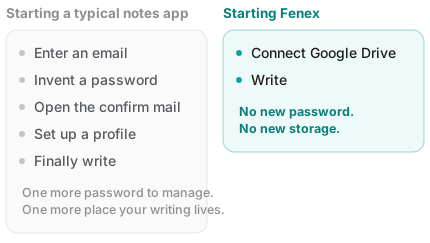
1. One more password to manage
If you use a password manager, it's one more entry. If you don't, it's likely one more reused password. Note apps rarely get filed under "important account," so the password tends to be a weak one.
Which is odd, because what goes inside is usually fairly personal.
2. One more place your writing lives
Creating an account means a slot for you now exists in that company's database. Your writing accumulates in that slot.
That's one more location to keep track of — one more place to count when you eventually ask yourself where all your notes ended up.
3. One more thing to undo later
Signing up takes three minutes. Leaving doesn't. Find the delete-account menu, press export, check whether the zip is usable, and go looking for another way when it isn't.
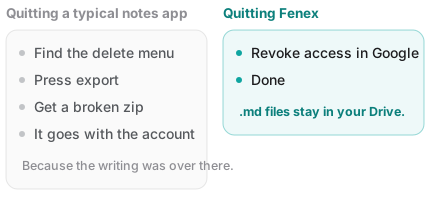
All of it traces back to one fact: your writing was over there.
So how does a no-sign-up notes app work?
The real reason apps need accounts is this: they need a label for where to put your stuff on their servers. An account is, functionally, an address tag for storage they own.
Which points at the answer. Don't store it on their servers.
Use an account you already have
Most people already have a Google account, and it comes with Google Drive attached. The storage already exists.
So all the app has to do is:
- Ask once whether it may access your Drive
- If you say yes, write files straight to your Drive from your browser
In that structure there's no slot to create on a company server — and so no reason to create an account.
This is not the same as "Sign in with Google"
Here's where the confusion usually lands. On most services, the "Continue with Google" button shortens the sign-up; it doesn't remove it. Google confirms who you are, and then that company still creates an account for you on its side. Your writing is still stored there.
There's an easy way to tell the difference:
When you disconnect, where is your writing? If the answer is "nowhere," you created an account.
Where this approach falls short
Being straight about it: no account also means none of the things an account does for you.
- It doesn't fit if you use a different cloud. If you're not on Google Drive, there's no starting point.
- There's no recovery desk. No account means no "forgot your password" flow. Recovery happens on the Drive side instead — trash and version history.
- Team features are weak. Role management and member invites need an account system to work well. Sharing leans on Drive's own sharing.
In short: a good fit for personal notes you keep yourself, a poor fit for documents an organization administers.
Fenex has no sign-up screen
Fenex has no registration step. Not as an omission — it's a structure where there's nothing to register.
- Connect Google Drive and start writing. No new password.
- Notes are saved as
.mdfiles in your Drive. No copy sits on a Fenex server. - Done with it? Revoke access in your Google account settings. There's no account-deletion process, and the files stay in your Drive.
No sign-up means no cancellation and no export, because you were never locked in.
Wrapping up
| Account-based | No sign-up | |
|---|---|---|
| Getting started | Email, password, confirmation | One Google connection |
| Where writing lives | That company's servers | Your own Google Drive |
| Leaving | Delete account + export | Revoke access; files stay |
| Best for | Team collaboration, permissions | Personal notes |
When you evaluate a notes app, ask "does this require an account?" The answer tells you almost exactly where your writing will be stored — because they're really the same question.
Want to see it? Open Fenex and write your first note. There's no sign-up screen in the way.
Related reading: