
Finding That AI Answer Again Two Months Later
"I asked an AI about this before."
So you open your chat history. Five similar titles stare back. You open a few, scroll a while, and eventually just ask again.
And this time the answer is a little different. You're fairly sure the old one was better.
This post is about why that happens, and how to keep an answer so it's actually findable two months later. The short version is three steps:
- Keep the conclusion, not the whole conversation
- Put the words you'll search for into the title
- Note when and where you asked
Why the chat list fails you
This isn't a memory problem. It's how the list is built.
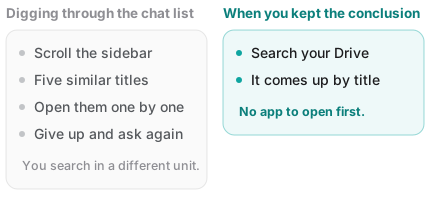
Chat titles come from your first question
Most AI services generate the conversation title from the question you opened with.
But conversations drift. You started with "recommend me a laptop," and the genuinely useful part turned out to be the twentieth reply — an explanation of how to drive two external monitors. The title still says "laptop recommendation."
The title doesn't represent the content.
You search in a different unit than the list stores
You're looking for one piece of an answer. The list is organized in whole conversations.
When the paragraph you want is buried in the middle of a fifty-turn exchange, finding the conversation only means you now have to scroll inside it. The units don't line up.
You ask the same thing more than once
Ask something similar a few days apart and you end up with several near-identical titles. Which one held "the answer" is impossible to tell without opening each.
And it doesn't travel
Switch services or clean up an account and months of conversations are affected as one block. Every useful answer you've collected sits bundled together in a single place.
Three steps to make it findable
1. Keep the conclusion, not the conversation
Save the whole thread and you'll have to re-read it later — which cuts the value of saving it roughly in half.
The easiest approach is to make the AI do the summarizing. At the end of a useful conversation, ask:
"Summarize just the conclusion and the reasoning from this conversation. Write it so I'll understand it in two months, and keep the background short."
For anything involving numbers or procedures, add:
"Flag any figures or sources I should verify separately."
Save that result. Fifty turns become one note.
2. Put searchable words in the title
This is the one that matters most. Two months from now you will not search for AI answer. You'll search with the words you were using at the time.
| Instead of | Write |
|---|---|
ChatGPT answer | Lease registration steps - do before moving |
Notes | Removing photo location data on a Mac |
Laptop | Two external monitors - is Thunderbolt required |
The trick is to include dates, proper nouns, and the words you actually used. There's more on this in how to organize notes.
3. Note when and where you asked
One line at the bottom of the note is enough:
2026-09-23 · asked ChatGPT · prices not verifiedWhy it matters: AI answers have a shelf life. Prices, policies and version numbers change within months. When you reopen the note later, knowing when the answer came from tells you immediately whether to trust it or re-check it.
What to keep, what to drop
| Keep | Drop |
|---|---|
| The conclusion, and why | Pleasantries and small talk |
| Numbers, dates, proper nouns | Wrong turns that got corrected |
| What you need to do next | Your own re-explanations |
| Anything flagged for verification | Repetition |
One test decides it: can future you read this and act immediately?
One thing to be careful about
Worth saying plainly: AI can be wrong. And once you save an answer, the wrong parts are saved too.
It gets riskier with time, because the line blurs between what you verified yourself and what the AI told you.
So mark it. This much is enough:
- Verified — checked against official docs, or you tried it
- Unverified — the AI said so, and you haven't confirmed it
One word. The difference between having that mark and not having it is bigger than it looks.
What this looks like in Fenex
Fenex is built to make those three steps easy.
- Paste, add a title, done. Drop in the summarized conclusion and give it a title with searchable words
- The title becomes the filename. It's saved to your Google Drive as
Lease registration steps - do before moving.md - Which means Drive's own search finds it — without opening Fenex, from your phone, from an office computer
- There's no sign-up, so you don't get another chat list to dig through
The heart of it: the answer lives as a file in your Drive, not in some service's conversation history. It stays yours even if you stop using that particular AI.
Wrapping up
- Not finding it isn't a memory failure. Titles don't represent content, and the units don't line up
- Keep the conclusion. Ask the AI to "summarize just the conclusion and the reasoning"
- Put searchable words in the title. Future you searches with the words of the moment
- Note the date, the source, and whether you verified it. AI answers have a shelf life
Try it with one answer you got today. Open Fenex, paste it, give it a title — it's saved as a .md file in your own Drive. No sign-up needed.
Related reading: