
Why ChatGPT Answers Paste With Asterisks (**) — And How to Save Them Cleanly
You asked an AI something and got a genuinely good answer. You copy it, paste it into a document, and get this:
## What you'll need
**The important part** is the order.
- First step
- Second step
On screen it was a clean heading and bold text. Pasted, it's a mess of asterisks and hashes.
Short version: this isn't a bug. And changing where you paste fixes it.
What those asterisks are: Markdown
AI answers are written using a formatting notation called Markdown.
Wrap words in two asterisks to make them bold, put a hash in front of a line to make it a heading. It's a convention, nothing more.
| What's written | What it means |
|---|---|
important | important (bold) |
## What you'll need | What you'll need (heading) |
- apples | • apples (list) |
` code ` | code (monospace) |
link | link |
ChatGPT and Claude look tidy on screen because those services interpret the convention for you. What the AI actually sent is the text with the asterisks in it.
So seeing asterisks means exactly one thing: the place you pasted into doesn't know the convention.
The result depends on where you paste
This is the part that matters. The same copied answer behaves completely differently depending on the destination.
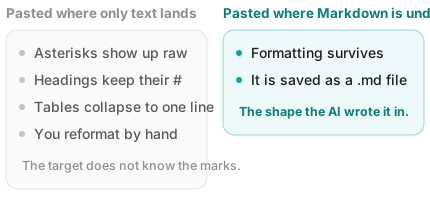
When you copy, two versions go onto the clipboard: one with formatting, one with plain text only. Which one the destination picks up decides what you see.
| Where you paste | What happens |
|---|---|
| Word, Google Docs | Formatting mostly survives |
| Notion | Survives (it reads Markdown directly) |
| Notepad, plain text fields | Raw asterisks |
| Messaging apps | Raw asterisks |
| A Markdown editor | Survives, and saves as Markdown |
Asterisks in Notepad and messengers are correct behavior. Those places only accept characters — there's no way for them to apply formatting. Nothing is broken.
Fixes by situation
When you want the formatting to survive
Paste somewhere that accepts formatting — Word, Google Docs, Notion, or a Markdown editor.
If asterisks still appear, check that you used plain Ctrl+V (Cmd+V on Mac). Some apps remember "keep text only" as your last paste choice.
When you want plain text on purpose
Sometimes you don't want foreign styling dragged into your document:
- Windows —
Ctrl + Shift + V - Mac —
Cmd + Shift + Option + V
That drops the formatting. Note that the asterisks will still come along — Markdown marks are characters, not formatting.
To get rid of the marks entirely, the fastest route is to ask the AI:
"Rewrite that as plain sentences, without any Markdown formatting."
When tables break
Tables break most often. A Markdown table looks like this:
| Item | Qty |
| --- | --- |
| Apples | 3 |
Paste that into a plain-text destination and you get exactly those pipe characters. If it's headed for a spreadsheet, asking the AI for "the same table as CSV" is far cleaner.
When a document is already full of asterisks
Sometimes you notice long after pasting. Find-and-replace can strip **, but you'll still be cleaning up heading hashes and list markers by hand.
If the original conversation is still there, re-copying is always faster. Which is why the destination matters in the first place.
So where should AI answers live?
One thing worth saying plainly: the tools below are all good tools. They're just good at different things.
- Word — strong for documents you print and submit. Page numbers, a table of contents, signature blocks.
- Google Docs — the best option when several people edit and comment at once.
- Notion — strong at managing things with table views and filters, and it reads Markdown on paste.
- Obsidian — works in Markdown natively and excels at densely linking notes. It does need an installed app, and using it across devices means arranging sync yourself.
But measured against the narrow goal of "just keep the answers the AI gave me," each of these is slightly too much or slightly off. You open a program to make one document, the content becomes that tool's own format, and moving devices takes preparation.
There's one more thing. AI answers are born as Markdown. Save them as Markdown and no conversion ever happens — nothing is lost in translation.
Fenex is built for that narrow job
Fenex is made for catching writing that was already Markdown, like an AI answer.
- Open it in a browser and paste. No install, no sign-up
- What you paste keeps its formatting while you edit. No asterisks to clean up
- It's saved to your Google Drive as a
.mdfile — the shape the AI wrote it in, so nothing is converted away - Open the same address on your phone and it's there. No sync to set up
Being straight about it: Fenex has no table views like Notion and no graph view like Obsidian. It's built to do one set of things well — catch, collect, and find again later. For keeping AI answers, more than that is usually unnecessary.
And a bonus. Once an answer is a file in your own Drive, you can hand that file straight back to an AI next time. You can't do that with an answer buried inside a conversation.
Wrapping up
- Asterisks aren't an error — they're Markdown, the notation AI writes in
- They show up because the destination only accepts characters. In Notepad and messengers that's correct
- To keep formatting, paste somewhere that accepts it; for plain text use
Ctrl+Shift+V - Tables break easily. Headed for a spreadsheet? Ask the AI for CSV
- If the goal is simply collecting answers, saving as Markdown loses the least
Copy an answer you got today and paste it into Fenex. Connect Google Drive and that's it — the note stays as a .md file in your own Drive.
Related reading: