Syncing Obsidian for Free — Three Ways, and What Each One Costs You
You write comfortably in Obsidian on your desktop, then try to open the vault on your phone and hit a wall. That's probably why you're here.
One thing worth saying first. Obsidian and many other note apps offer paid sync plans, and that's fair. Moving files safely between devices requires servers, and servers cost money. Users share that cost, and the app keeps getting built. Wanting a free option shouldn't mean wanting something for nothing.
Still, one question lingers. My files already live in my own cloud — why pay again to move them?
This post covers two things: three realistic free sync methods and the trap in each, and then why sync becomes a paid feature in the first place.
Three ways to sync Obsidian for free
1. Put the vault inside a cloud drive's sync folder
This is the common approach. Drop your vault folder inside Google Drive, OneDrive, or iCloud's synced folder, and desktop-to-desktop works reasonably well.
The trap isn't on desktop — it's mobile.
- Mobile cloud apps generally use an on-demand model. They don't keep the whole folder expanded locally, so mobile Obsidian often can't open it as a vault at all.
- Touch the same note on two devices and you get conflict copies. Files like
note (conflicted copy)quietly accumulate. - Open the vault elsewhere before sync finishes and you're looking at a half-uploaded state.
In practice, these habits cut down on accidents:
- Open the vault on one device at a time
- Wait for the sync-complete indicator before switching machines
- Syncing the plugin config folder (
.obsidian) increases conflicts. Leave it out if you don't need it
2. Manage it with Git
If you're comfortable with developer tooling, this is a solid choice. It's free, and you get a complete change history — you can bring back a paragraph you deleted by mistake.
The trap is mobile.
- You have to remember to commit and pull on your phone. Forget once and things drift apart
- Resolving a conflict from a phone is genuinely awkward
- Lots of images and PDFs make the repository heavy fast
So: excellent for a text-heavy vault you use alone, and increasingly hands-on the further you get from that.
3. Device-to-device sync tools
Tools like Syncthing match files directly between your devices with no central server. There's no service fee, and your files never pass through someone else's server — a real advantage.
The trap is just as clear.
- Both devices have to be awake to sync. Take only your phone out and changes wait
- iOS restricts background activity heavily
- Initial setup is harder than the other two
Comparing the three
| Method | Cost | Mobile | Main trap |
|---|---|---|---|
| Cloud sync folder | Free | Weak | Conflict copies, partial sync |
| Git | Free | Awkward | Conflict resolution, attachment size |
| Device-to-device | Free | Limited | Both devices must be on |
| Official paid sync | Subscription | Strong | — |
The pattern: free methods trade money for maintenance. The more your vault matters, the more that trade becomes a real risk.
So why is sync a paid feature at all?
Step back and the structure becomes visible.
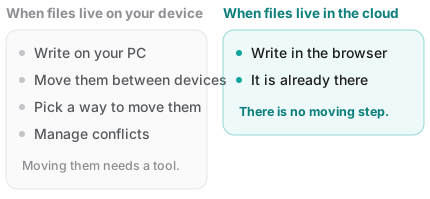
Obsidian works on a local folder on your computer. That's a genuine strength: it opens without internet, and the files survive the app.
But because the files sit inside a device, something has to carry them to your other devices. Sync services do that carrying, and that's what you're paying for.
Flip it around and the answer is simple. If the files live in your cloud from the start, there's no carrying step — and nothing to charge for.
Splitting the job makes this easier
Here's what needs saying plainly: Fenex is not a replacement for Obsidian.
- No backlinks, no graph view
- No plugins
- No nested folder structures
Obsidian is far better at the deep, interlinked work. Keep doing that there.
But another situation comes up constantly: a line that occurs to you on the train, something to check from an office computer, a quick note on your phone. Trying to carry the entire vault around for those moments is where the sync problems start.
Fenex is built for exactly that slot.
- Open it in a browser, connect Google Drive, done. No install, no sign-up
- What you write is saved to your Drive as a
.mdfile immediately. No carrying step means no device limits and no sync fee - Open the same address on your phone to continue. Add it to your home screen and it behaves like an app
And because both use the same Markdown files, anything you jot down outside can be moved into your vault later. Nothing to convert, nothing to export.
To be clear about one limitation: Fenex does not open your existing vault folder. It creates its own folder in Drive and works inside it. The natural pattern is to leave your vault alone and collect only your out-and-about notes here.
Wrapping up
- Free sync is possible — you just pay in maintenance instead of money
- Cloud folders break down on mobile, Git breaks down at conflicts, device sync breaks down when one device is off
- Sync costs money because files live inside a device. Files already in the cloud have nowhere to be carried to
- Vault for deep work, browser for the quick line. Splitting the roles shrinks the sync problem itself
If keeping your out-and-about notes separate sounds right, open Fenex and write a single line. Connect Google Drive and that's it — the file stays in your Drive.
Related reading: