
Handing Your Own Notes Back to an AI
Do you find yourself typing this again at the start of every new conversation?
"I work on a team of five, we went with option B instead of A last time, the budget is around…"
Every conversation starts from zero. So you re-explain the background each time, you leave out a condition when you're in a hurry, and the answers come back slightly different every time.
The fix is simple. Write the background once, keep it as a file, and hand it over.
This is the last post in a short series. You've pulled the answer out → given it a title and kept it → now it's time to use what you kept.
Why you keep starting over
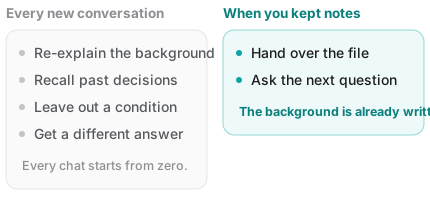
Some services remember things across conversations, but you have little control over what got remembered. The thing you wanted kept gets forgotten, while an offhand remark sticks around for months.
Your own notes are different: you know what's in them. You can read them, edit them, and hand over only what's relevant. Passing a document beats relying on memory, simply because it's predictable.
Three ways to hand notes to an AI
1. Copy and paste — the most reliable
For a short note, this is the best option. It works in every AI tool, and nothing can go wrong in a file-reading step.
Wrapping it like this makes the boundary between your material and your question unmistakable:
Below is my note. Answer on the basis of it.

---
(paste the note)
---

Question: Given these conditions, list the next three things I should do.
2. Attach it as a file — for several at once
When you have multiple notes, or long ones, files are better. And .md files have an advantage here.
- Nothing is converted. Markdown keeps its formatting as characters in the text, so the AI reads your headings, lists and tables as structure
- No extra baggage. Word files and PDFs carry fonts, margins and page layout alongside the words, and tables or ordering can get scrambled on the way in
- They're small. For the same content, a text file is far lighter
If you use Fenex, the download button in the note list gives you the .md file to attach directly. On iPhone it hands off to the share sheet.
3. Connect your cloud
Some AI services can connect to cloud storage like Google Drive and read files directly. If your notes already live in Drive, that's convenient.
Be aware, though, that support and behavior differ by service and change often. And connecting means that service can read files in your Drive — worth checking what scope of access you're granting.
What makes a note easy for an AI to read
The same content lands differently depending on how it was written down. None of this is difficult.
- Conclusion at the top — like people, models weight the opening more heavily
- A title that says what it is — a file called
notes3.mdtells the AI nothing about what it just received - Dates and sources — "accurate as of March 2026" lets the model account for the age of the information
- Separate verified from unverified — hand over a guess as fact and the next answer stacks another guess on top
It's the same advice as the previous post. A note that future you can find is a note an AI can read.
Keep your prompts as notes too
This habit pays off more than you'd expect: keep the instructions you reuse in a single note.
Instead of retyping a similar request each time, copy it from the note. And each time you use it, tighten it a little — it gets better as it goes.
Something like:
[Meeting notes]
Organize the notes below into three groups: decided,
still open, and who does what by when.

[Email polish]
Rewrite this draft to be polite but short.
Apologize once, and put the request in one line at the end.

[Before reading]
Pull out only the decisions I need to make from this document.
Skip the background.
Save it as something like prompts I reuse.md and you can open it on your phone and copy from there.
One caution: look before you paste
This part matters. The moment a note goes into an AI, it has left your hands.
Check twice for:
- Company material — internal rules may prohibit putting it into outside tools
- Other people's information — contact details, health or financial facts in your note belong to them, not you
- Credentials — passwords, verification codes, API keys
Pasting the whole note is convenient, but cutting out only the part you need is the safer habit. Services differ in whether your input is used for training and how to change that, so it's worth checking the setting on any tool you use often.
With Fenex this gets shorter
When your notes are already in Fenex, handing them to an AI is less work.
- Your writing is already a
.mdfile in your own Google Drive. There's nothing to export - When you need one, the download button gives you the
.mdfile to attach as-is - The title is the filename, so the attachment's name already tells the AI what it's looking at
- It runs in a browser, so opening a note on your phone to copy from it is easy
It's the same point as the last post. An answer buried in a conversation is hard to reuse. An answer kept as a file can be pulled out any time.
Wrapping up
- Instead of retyping your background, write it once, keep it as a file, and hand it over
- Short note: paste it. Several notes: attach
.mdfiles - Conclusion at the top, a title that says what it is, dates and sources — that's what reads well
- Keep the prompts you reuse in one note too
- Before pasting, check for company material, other people's data, and credentials
Three posts, one sentence: keep the good answers as your own files, not as conversations. That's what makes them findable, and reusable.
Open Fenex and keep one answer from today. No sign-up — just connect Google Drive.
Earlier in this series: